Sell my domain with GoDaddy's List for Sale
List your domains for sale using GoDaddy's List for Sale (LFS) domain listing service. Your domain will show for sale on over 100 top registrars and reseller websites collectively.
Note: If your domain has Domain Protection active, you'll need to downgrade your protection plan after the sale is made.
Note: Domains that are part of a bundle cannot be listed for sale.
- Sign in to your GoDaddy Domain Portfolio. (Need help logging in? Find your username or password.)
- Select the checkboxes for the domains you'll be listing. Or, select the check mark icon and Select All.
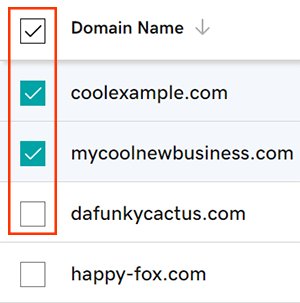
- Select List for Sale from the action menu. Depending on your screen size, you may need to select the More menu and scroll down to see Lock.
- Select Get Started.
- Enter your own listing price, or select Use Est. Value to use our estimated value.
- (Optional) Select the checkbox to replace your current website with a "For Sale" landing page.
- Select Next to publish your listing. If your domain has Domain Protection, you'll need to verify your identity. If you've had 2-step verification (2SV) turned on for at least 24 hours, enter the code we sent via SMS, or enter the code from your authenticator app. Otherwise, enter the one-time password we sent to your registrant email address.
- Finish listing your domains with your Afternic account:
- I don't have an Afternic account: Select Create Account & Publish Listing. We'll create an Afternic account using your GoDaddy account details.
- I have an Afternic account: Select Sign In, enter your Afternic account credentials, and then select Sign In & Publish Listing.
You'll see a Success confirmation, letting you know your domains have been submitted for listing. Select Manage this domain to view your listings. Or, select Close to return to your domain list.
Related step
- Make sure you complete your payee profile on Afternic to avoid delays in processing your disbursement.
- View and edit your domain listings in your account.
More info
- Changed your mind? Delete your domain listing at any time.

