Forward my GoDaddy domain
Forward your domain registered with GoDaddy and send visitors to a different page when they visit your domain. Forwarding is useful when you've already built a website elsewhere, or if you want to connect your domain to a social media page.
Note: Forwarding over HTTPS is now automatically applied to your domain when you set up forwarding following these steps. There's nothing additional you need to do and your domain forwarding will be more reliable and more secure with this new feature.
- Sign in to your GoDaddy Domain Portfolio. (Need help logging in? Find your username or password.)
- Select an individual domain to access the Domain Settings page.
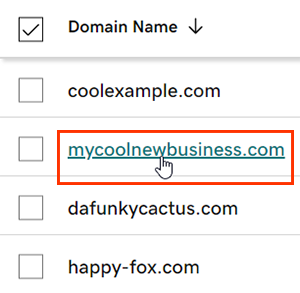
- Select DNS and then select Forwarding.
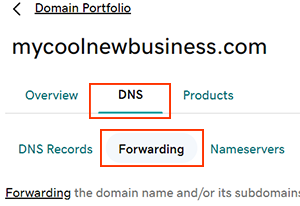
- Select Add Forwarding.
- Domain: Add forwarding to your root domain, such as coolexample.com.
- Subdomain: Add forwarding to a subdomain, such as subdomain.coolexample.com.
- If you're setting up forwarding on a subdomain, enter the subdomain you want forwarded. We'll automatically update the DNS for the subdomain if it already exists, or we'll add the subdomain if it doesn't.
- Choose http:// or https:// for the destination URL.
Note: This option applies to the destination URL, where your domain will be forwarding to. For example, coolexample.com can be forwarded to https://mycoolnewbusiness.com or http://mycoolexample.com depending on your selection. - Enter the destination URL your domain will forward to. This is where we'll send visitors when they type your domain in their browser address bar, and must follow these guidelines.
- First and last characters must be a number or letter
- Periods (.) are supported
- Maximum of 1,000 characters
- Consecutive periods (…) are not supported
- Underscores (_) are not supported
- Choose the forwarding type:
- Permanent (301): Sends users to the destination URL and tells search engines to display the new site content as the permanent location for the domain.
- Temporary (302): A temporary change that redirects both users and search engines to the desired new location for a limited amount of time, until the redirect is removed.
- Forward with masking: Forward with masking sends visitors to your domain over to the destination URL, but keeps your domain in the browser address bar. It also gives you the option to enter meta-tags for search engine info.
Note: Some websites don't support masking and may not properly display the desination site.
- (Optional) If you selected Forward with masking for the forwarding type, select Next, enter details for at least one of the fields, and then select Save.
- Title: A short phrase (maximum of 80 characters) that displays on the browser tab and in search results.
- Description: A brief explanation (maximum of 150 characters) of your website to display in search engine results.
- Keywords: A list of keywords (maximum of 500 characters) that describe the content and purpose of your website.
- Select Save to apply your new forwarding settings.
- If your domain has Domain Protection, you'll need to verify your identity. If you've had two-step verification (2SV) turned on for at least 24 hours, enter the code we sent via SMS, or enter the code from your authenticator app. Otherwise, enter the one-time password we sent to your registrant email address.
We'll automatically update your domain to GoDaddy nameservers if they aren't with us. Most DNS updates take effect within an hour, but could take up to 48 hours to update globally.
Related step
- If you want the www version of your domain name to forward as well, make sure your www CNAME is pointing to @.
More info
- Adding forwarding will automatically update and lock your @ A record. If you need to change it, you'll need to delete forwarding first.
- Not all websites can be masked. If your masked domain is showing a blank white page, you'll need to switch to Forward only, or contact the website provider for the destination URL about allowing masking.
- Set up 2-step verification for the best security on your domains and account.

