Using Mozilla Thunderbird with IMAP or POP Email
You can configure Thunderbird™ to access the email messages for your IMAP or POP address. While these screen shots are from v2.0.0 on Mac OS X, these settings are similar in other versions of Thunderbird.
Before You Start:
- Have your full email address and account password ready.
- Find your incoming and outgoing server names, click here to learn how.
To Use Mozilla Thunderbird with Your Email
- From the Tools menu, select Account Settings.
- Click Add Account
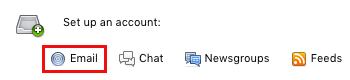
- In the New Account Setup window, select Email Account and click Continue.
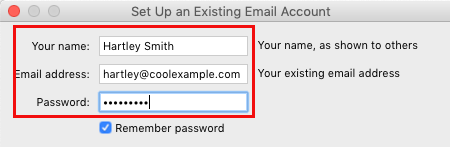
- In the Identity window, type your Name and Email Address and click Continue.
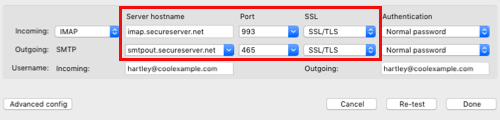
- In the Server Information window, enter your Incoming POP or IMAP Server and Outgoing SMTP Server.
NOTE: Click here for help finding your POP, IMAP, and SMTP settings.
- Choose Continue.
- In the User Names window, type your email address in the Incoming User Name and Outgoing User Name fields.
- Click Continue.
- In Account Name, type an identifying name.
- Click Continue.
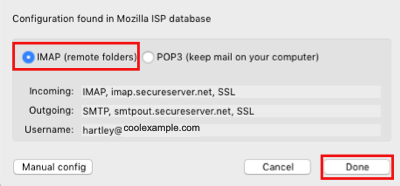
- On the Congratulations screen, preview your account information for accuracy and click Done.
- Select Server Settings from the folder list below your new email account and make the following changes:
- Server Port
- IMAP without SSL - 143
IMAP with SSL - 993
POP without SSL - 110
POP with SSL - 995 - (Optional) Use secure connection:
- Select SSL
- Use secure authentication
- Do not enable
- Click OK.
- Select Outgoing Server (SMTP) from the folder list below the new account and make the following changes:
- Server Port
- Without SSL - one of the following: 25, 80, 3535
With SSL - 465 - (Optional) Use secure connection
- Select SSL
- Click OK.
For information on changing an existing Thunderbird email account to use SSL, see Configuring Mozilla Thunderbird to use a Secure Connection (SSL) for Email Messages.
For information on setting up Mozilla Thunderbird see Mozilla Messaging Support.
NOTE: As a courtesy, we provide information about how to use certain third-party products, but we do not endorse or directly support third-party products and we are not responsible for the functions or reliability of such products. Thunderbird™ is a trademark of the Mozilla Foundation in the United States and/or other countries. All rights reserved.