Renew my domains
Manually renew domains and recover recently canceled domains in your account. Check the cost of renewal first by customizing your domain columns. If your domain has already expired, you can attempt to recover it.
Note: Domains that are part of a bundle can set their bundle to manually renew on a monthly basis.
- Sign in to your GoDaddy Domain Portfolio. (Need help logging in? Find your username or password.)
- Select the checkboxes next to the domains you'll be updating. Or, select the checkbox next to Domain Name and then choose Select All.
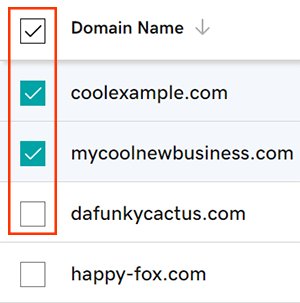
- Select Renew Now from the action menu.
- Choose your renewal settings, then select Continue.
- Check the box next to Turn on Auto-renew to make sure your domain registration continues uninterrupted.
- Finish renewing your domains during checkout in the cart.
Your updated expiration date will show in your account within 90 minutes.
Related steps
- Avoid domain expiration by turning on auto-renew.
- Renewing your domain name does not renew your email or website. Don't forget to renew your other products as well.
More info
- Some domains may have special requirements for renewals.
- Set up 2-step verification for the best security on your domains and account.
- Protect your domain from accidental expiration and unauthorized actions by adding or upgrading Domain Protection.
- Looking for a new domain? Get your perfect GoDaddy domain today.

